🇰🇷 KR
EN 🇺🇸
Linklass

Linklass

수업 예약 & 스케줄 관리Lesson Booking & Schedule Management

App Store Google Play
웹에서 바로 사용하기Use on the Web

주요 기능Features

📅

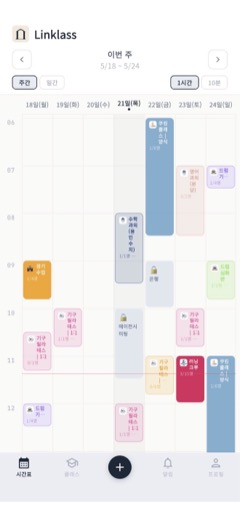
주간 시간표Weekly Timetable

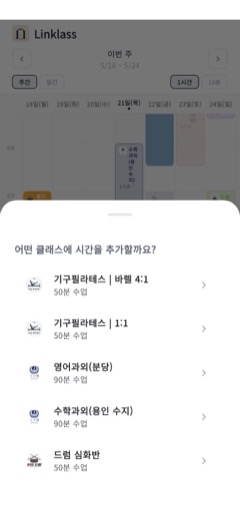
24시간, 10분 단위의 정밀한 시간표. 내 수업과 수강 일정을 한눈에 확인하세요.Precise 24-hour, 10-minute interval timetable. See all your lessons at a glance.

🔗

간편한 클래스 연결Easy Class Connection

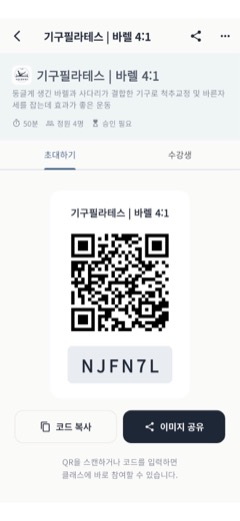
6자리 코드 또는 QR 스캔으로 강사의 클래스에 바로 참여할 수 있습니다.Join an instructor's class instantly with a 6-digit code or QR scan.

🎫

수강권 관리Lesson Credits

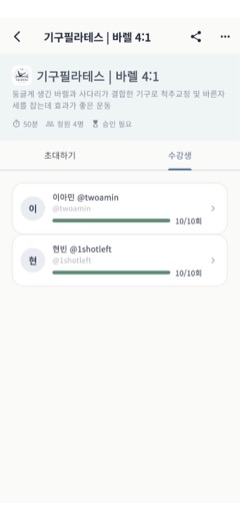
수강 횟수 부여, 수업 완료 시 자동 차감. 강사와 학생 모두 투명하게 관리합니다.Issue credits and auto-deduct on completion. Transparent tracking for both sides.

상호 확인 시스템Mutual Confirmation

수업 완료는 강사와 학생 양쪽 확인 후 처리. 신뢰할 수 있는 수업 기록을 남깁니다.Lessons are completed only after both parties confirm. Reliable lesson records.

👥

그룹 수업 지원Group Lessons

1:1부터 대규모 그룹까지 정원 관리. 잔여석을 실시간으로 확인할 수 있습니다.From 1:1 to large groups. Manage capacity and check open seats in real time.

🔔

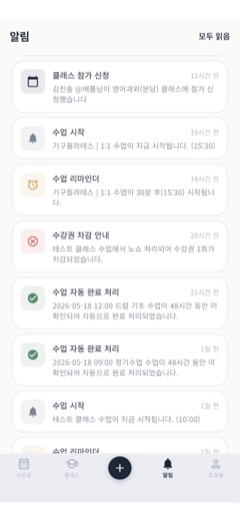
실시간 알림Real-time Notifications

예약 요청, 수업 리마인더, 완료 확인까지 놓치지 않도록 알림을 보내드립니다.Booking requests, lesson reminders, and confirmations — never miss a thing.

🔒

프라이버시 보호Privacy Protection

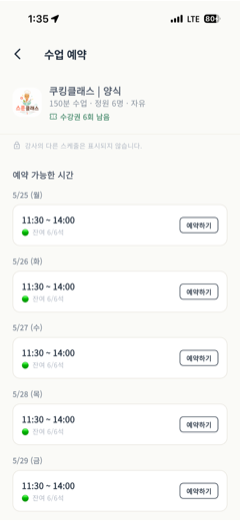
학생은 강사의 다른 스케줄을 볼 수 없습니다. 예약 가능한 시간만 안전하게 표시됩니다.Students cannot see the instructor's other schedules. Only available slots are shown.

📲

홈 화면 위젯Home Screen Widget

앱을 열지 않아도 홈 화면 위젯에서 이번 주 시간표와 다음 수업을 바로 확인하세요. (iOS · Android)Check this week's schedule and your next lesson right from a home screen widget, without opening the app. (iOS · Android)

🔄

역할 모드 선택Role Mode

강사 전용, 학생 전용, 또는 둘 다 모드를 선택해 나에게 맞는 화면으로 사용할 수 있습니다.Choose Instructor, Student, or Both mode to tailor the app to how you use it.

⏱️

학생별 개인 수업시간Per-Student Lesson Time

같은 클래스에서도 학생마다 수업 시간을 다르게 설정할 수 있어 유연한 일정 관리가 가능합니다.Set a different lesson duration for each student within the same class for flexible scheduling.

🌐

한/영 지원Bilingual

한국어와 영어를 한 번의 탭으로 전환할 수 있습니다.Switch between Korean and English with one tap.

이런 분들에게 추천합니다Who is it for?

강사도, 학생도 하나의 앱으로 모든 수업을 관리합니다One app for both instructors and students to manage all lessons

🎹 음악 레슨 강사🎹 Music Instructors 💪 PT / 운동 트레이너💪 Personal Trainers 📚 과외 선생님📚 Private Tutors 🎨 미술 / 공예 강사🎨 Art / Craft Instructors 💼 1:1 상담사💼 1:1 Consultants 🏫 소규모 스튜디오🏫 Small Studios 👨‍🎓 수업을 듣는 학생👨‍🎓 Students

사용 예시How It Works

강사도, 학생도 4단계면 시작할 수 있어요Both instructors and students can get started in 4 steps

🎓 강사INSTRUCTOR

수업을 운영해요Run your lessons

내 클래스를 만들고 학생을 초대하면 끝Create a class and invite students
  1. 1
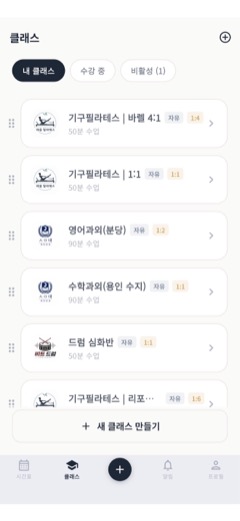
    클래스 만들기Create a class
    이름·수업 시간(10분 단위)·정원·색상·이모지를 자유롭게 설정합니다.Set name, duration (10-min units), capacity, color, and emoji freely.
    정기 / 자유 수업 중 선택Choose Recurring or Free schedule
  2. 2
    학생 초대하기Invite students
    6자리 코드나 QR을 공유하면 학생이 바로 참여할 수 있어요.Share a 6-digit code or QR code — students join instantly.
  3. 3
    수업 시간 열기Open lesson times
    시간표에 슬롯을 만들면 학생에게만 예약 가능한 시간으로 표시됩니다.Open slots in your timetable — only those appear to students.
    내 다른 일정은 학생에게 노출되지 않아요Your other schedules stay private
  4. 4
    출석·수강권 관리Track attendance & credits
    수업 완료 시 양쪽 확인으로 수강권 자동 차감. 노쇼는 강사가 직접 처리합니다.Credits auto-deduct on mutual confirmation. Handle no-shows manually.
📚 학생STUDENT

수업을 들어요Take lessons

강사가 보낸 코드 하나면 시작Start with the code from your instructor
  1. 1
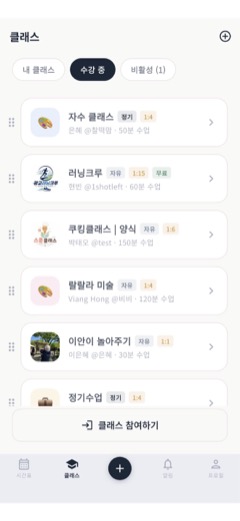
    클래스 참여하기Join a class
    강사가 보내준 6자리 코드를 입력하거나 QR을 스캔하면 바로 참여됩니다.Enter the 6-digit code or scan the QR — you're in.
  2. 2
    원하는 시간 예약Book a time you like
    강사가 열어둔 시간만 보여서 깔끔하게 선택할 수 있어요. 잔여석도 실시간 확인.Only available slots are shown — see real-time open seats.
    강사의 다른 스케줄은 보이지 않아요Instructor's other times stay hidden
  3. 3
    알림으로 수업 참석Attend with reminders
    수업 시작 전 리마인더 알림이 옵니다. 시간을 놓치지 않아요.Get reminders before lessons start so you never miss one.
  4. 4
    완료 확인 & 이력 보기Confirm & view history
    수업 후 "완료" 버튼만 누르면 수강권이 차감되고, 모든 수업 이력이 한눈에 정리돼요.Tap "Complete" after class — credits deduct and full history is logged.
문의 / 개선요청Ask / Suggest